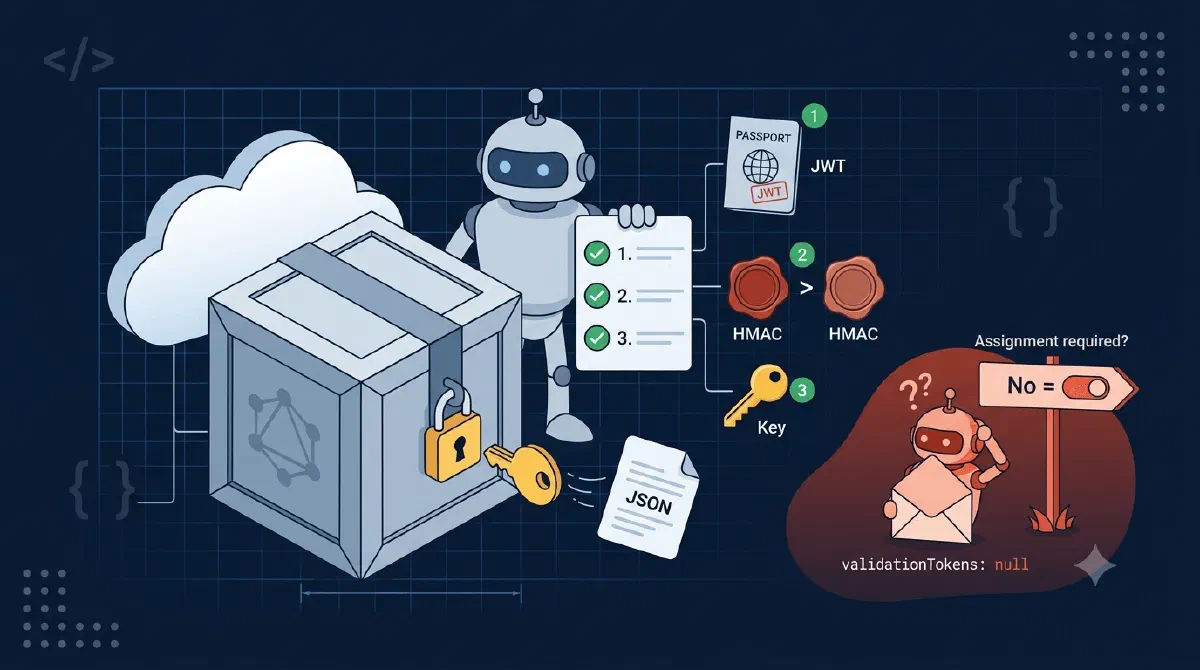
Microsoft Graph rich notifications are great: the webhook payload carries the resource data itself, so you can act on a change without calling back. What the docs undersell is that the payload arrives as three base64 blobs (data, dataKey, dataSignature) plus a set of JWTs, and undoing that envelope is entirely your job.
My first attempt got a null where the JWTs should be, and my second got ciphertext I couldn’t decrypt. Both failures were one configuration flag and one crypto convention away from working, so here’s the whole pipeline in one place.
TL;DR
Prove the batch is from Microsoft by validating every JWT invalidationTokens (signature keys from your tenant’s OIDC metadata, issuer your tenant, audience your app id) and checking clientState. Then decrypt in three steps: RSA-unwrap the AES key from dataKey with your certificate’s private key (OAEP), verify dataSignature as an HMAC-SHA256 over the encrypted data before decrypting, then AES-CBC-decrypt with the IV taken from the first 16 bytes of the key. If validationTokens is null, your service principal has “Assignment required” turned on.First, Prove It’s Microsoft
Anyone who discovers your notification URL can POST to it. Rich notification batches ship signed JWTs in validationTokens, and all of them must validate before you touch the content:
var configManager = new ConfigurationManager<OpenIdConnectConfiguration>(
    $"https://login.microsoftonline.com/{tenantId}/v2.0/.well-known/openid-configuration",
    new OpenIdConnectConfigurationRetriever());

var parameters = new TokenValidationParameters
{
    ValidAudiences = new[] { clientId, "https://graph.microsoft.com" },
    ValidIssuers = new[]
    {
        $"https://login.microsoftonline.com/{tenantId}/v2.0",
        $"https://sts.windows.net/{tenantId}/"     // tokens still show up v1-style
    },
    ConfigurationManager = configManager           // fetches + caches signing keys
};

foreach (string token in validationTokens)
{
    var result = await new JsonWebTokenHandler().ValidateTokenAsync(token, parameters);
    if (!result.IsValid) return false;             // one bad token fails the batch
}
On top of that, check that each notification’s clientState equals the secret you set at subscription time. And when a batch fails validation, still answer 202 - you’re telling Graph “delivered”, not “approved”, and a 4xx just buys you a retry storm of the same bad batch.
Then, Undo the Envelope
Graph encrypts each payload with a fresh AES key, and encrypts that key with the public certificate you provided when subscribing. Your job is the reverse, in exactly this order:
public string Decrypt(string data, string dataKey, string dataSignature, X509Certificate2 cert)
{
    byte[] encryptedKey = Convert.FromBase64String(dataKey);
    byte[] encryptedData = Convert.FromBase64String(data);
    byte[] expectedSignature = Convert.FromBase64String(dataSignature);

    // 1. Recover the single-use AES key with our private key.
    using RSA rsa = cert.GetRSAPrivateKey()!;
    byte[] symmetricKey = rsa.Decrypt(encryptedKey, RSAEncryptionPadding.OaepSHA1);

    // 2. Verify integrity BEFORE decrypting.
    using (var hmac = new HMACSHA256(symmetricKey))
    {
        byte[] actual = hmac.ComputeHash(encryptedData);
        if (!CryptographicOperations.FixedTimeEquals(actual, expectedSignature))
            throw new CryptographicException("Data signature mismatch.");
    }

    // 3. AES-CBC-PKCS7. The IV is the first 16 bytes of the key itself.
    using var aes = Aes.Create();
    aes.Key = symmetricKey;
    aes.Mode = CipherMode.CBC;
    aes.Padding = PaddingMode.PKCS7;
    aes.IV = symmetricKey[..16];

    using var decryptor = aes.CreateDecryptor();
    byte[] plaintext = decryptor.TransformFinalBlock(encryptedData, 0, encryptedData.Length);
    return Encoding.UTF8.GetString(plaintext);     // the resource JSON
}
What’s happening here?
dataKeyis the AES key, RSA-encrypted with your cert’s public key. OAEP padding, and each notification item can carry a different key - never cache it.- The HMAC check runs on the encrypted bytes, before decryption. If someone tampered with the ciphertext, you find out without feeding attacker-controlled bytes to your AES code.
FixedTimeEqualskeeps the comparison from leaking timing. - There’s no separate IV field anywhere in the notification. The convention is that the first 16 bytes of the symmetric key double as the IV - miss that and you get either garbage or a padding exception, with nothing pointing at the cause.
The result is plain JSON for the resource, shaped by whatever $select you put on the subscription.
The Null Token Trap
My actual first failure: validationTokens was null on every batch, so nothing could ever validate.
The cause is an Entra setting nowhere near your webhook code. For rich notifications, the app’s service principal must have appRoleAssignmentRequired = false (Enterprise applications, your app, Properties, “Assignment required?” = No). Alternatively, keep it on and explicitly assign an app role to the Microsoft Graph Change Tracking service principal (appId 0bf30f3b-4a52-48df-9a82-234910c4a086). Do neither, and Graph silently sends null tokens and your endpoint rejects every batch it was built to receive.
Gotchas
- Two things are named “validation token”. The plain-text
validationTokenquery parameter you echo back during the subscription handshake, and the JWT arrayvalidationTokenson every rich batch. Different formats, different purposes, one letter apart. - Basic notifications have no tokens at all. If the same endpoint also receives non-rich subscriptions, don’t demand JWTs from those batches; there
clientStateis your only check. - Plan for two certificates during rotation. Old subscriptions keep encrypting with the old cert for a while. Pick the cert by each notification’s
encryptionCertificateIdinstead of assuming the newest, and retire the old one only when it stops appearing. - The cert can be self-signed. Graph only uses the public key for encryption and never checks the issuer. RSA, 2048 to 4096 bits.
Wrapping Up
Treat a rich notification as untrusted input until it has passed three gates: JWTs validated, clientState matched, HMAC verified - and only then decrypt (RSA-unwrap, then AES-CBC with the key’s first 16 bytes as IV). And if the tokens come back null, stop debugging your code and go flip “Assignment required” on the service principal.
References