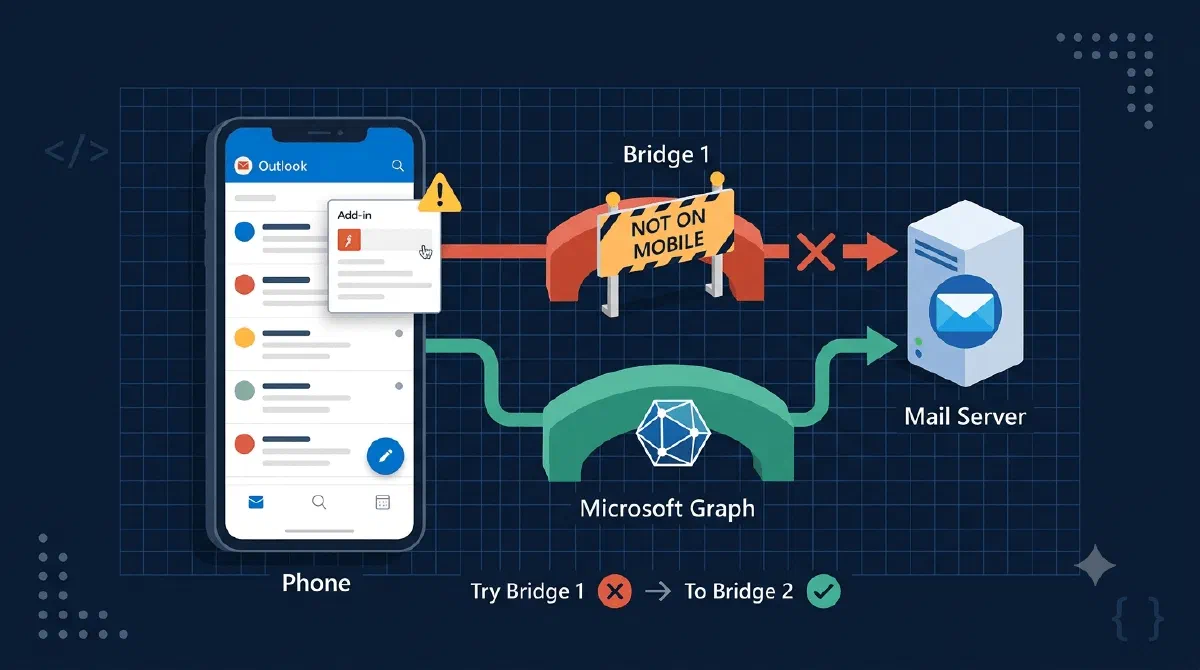
In my last post I showed how declaring a low Mailbox requirement set in the manifest got my Outlook add-in to show up on mobile. Great. Button’s there, task pane opens, everything looks alive.
Then the user taps “Archive to SharePoint” and the whole feature stands on one API: getAsFileAsync(), which hands you the entire email as a file. That API lives in Mailbox 1.14. Outlook mobile doesn’t have it.
So now I had the opposite problem from last time: instead of an invisible add-in, I had a visible add-in with a dead button. Honestly, that’s worse.
Visible ≠ functional. This post is about the second half of the mobile story: getting the same email bytes through a different door.
TL;DR
WhengetAsFileAsync isn’t available, download the exact same MIME content from Microsoft Graph instead: GET /me/messages/{id}/$value returns the raw RFC 822 message. Wrap both paths so they return the same Blob, put the Graph one in a catch, and everything downstream of “give me the email as a file” never knows the difference.The Desktop Path: Just Ask Outlook
On desktop and web, Office.js does all the work. You ask the host for the current message as a file, and it hands you the EML as base64. No network call, no token, no permissions dance, Outlook already has the email.
function getMessageAsBlob(): Promise<{ bytes: Uint8Array; blob: Blob }> {
  return new Promise((resolve, reject) => {
    if (!Office.context.requirements.isSetSupported("Mailbox", "1.14")) {
      return reject(new Error("This client does not support Mailbox 1.14 (getAsFileAsync)."));
    }

    const item = Office.context.mailbox.item as Office.MessageRead;
    item.getAsFileAsync((asyncResult) => {
      if (asyncResult.status === Office.AsyncResultStatus.Failed) {
        return reject(asyncResult.error);
      }

      // getAsFileAsync returns the EML as base64
      const bytes = Uint8Array.from(atob(asyncResult.value), (c) => c.charCodeAt(0));
      const blob = new Blob([bytes], { type: "message/rfc822" });
      resolve({ bytes, blob });
    });
  });
}
Notice the first thing this function does: check isSetSupported("Mailbox", "1.14") and reject if it’s not there. That reject is not an error case, it’s a signal. Remember it, it becomes important in a minute.
The Graph Path: Ask Exchange Instead
Here’s the realization that saved the mobile experience: Outlook doesn’t own your email, Exchange does. The host app is just one way to get at it. Microsoft Graph is another, and Graph has an endpoint that returns the raw MIME content of any message:
async function getMessageAsBlobViaGraph(): Promise<{ bytes: Uint8Array; blob: Blob }> {
  const item = Office.context.mailbox.item as Office.MessageRead;
  if (!item?.itemId) {
    throw new Error("No item ID available for Graph-based archive.");
  }

  const token = await getToken(["Mail.ReadWrite.Shared"]);

  const mimeUrl = `https://graph.microsoft.com/v1.0/me/messages/${encodeURIComponent(item.itemId)}/$value`;
  const resp = await fetch(mimeUrl, {
    method: "GET",
    headers: { Authorization: `Bearer ${token}` },
  });

  if (!resp.ok) {
    throw new Error(`Error ${resp.status}: ${resp.statusText}`);
  }

  const buffer = await resp.arrayBuffer();
  const bytes = new Uint8Array(buffer);
  const blob = new Blob([buffer], { type: "message/rfc822" });
  return { bytes, blob };
}
What’s happening here?
item.itemIdis all we need from Office.js, and reading it only requires Mailbox 1.1. That’s the beautiful part: the manifest floor from the last post promised almost nothing, and this fallback only needs almost nothing.- The
$valuesegment on/me/messages/{id}tells Graph to skip the JSON representation and return the raw RFC 822 message, the same EML you’d get fromgetAsFileAsync. - We wrap it in a
Blobwithmessage/rfc822, the exact same shape the desktop path produces. Same email, different source. - The token comes from MSAL with the
Mail.ReadWrite.Sharedscope. And yes, getting a token inside Outlook mobile is its own adventure, the magic words are Nested App Auth (NAA), where sign-in goes through the Microsoft Authenticator app instead of a browser popup. That one deserves its own post someday.
One honest caveat: I pass item.itemId straight to Graph without converting it. That works because modern hosts (including mobile) hand out REST-format IDs. If your add-in also runs in older Outlook clients that still produce EWS-format IDs, run the ID through Office.context.mailbox.convertToRestId() first, or Graph will give you a very confusing 404.
Don’t Branch, Fall Back
So we have two functions. The tempting way to pick between them is if (isMobile) { ... } else { ... }. I did it differently, and I’m glad I did:
let messageAsBlob: { bytes: Uint8Array; blob: Blob };
try {
  messageAsBlob = await getMessageAsBlob();
} catch {
  // Office.js getAsFileAsync unavailable (e.g. mobile) - fall back to Graph
  if (getMessageAsBlobViaGraph) {
    messageAsBlob = await getMessageAsBlobViaGraph();
  } else {
    throw new Error("Email export is not available on this platform.");
  }
}
Always try Office.js first, and let the failure route you to Graph. Remember that reject on the 1.14 check? On mobile it fires every time, and the catch block quietly takes the Graph road instead.
Why is this better than platform-branching? Because it’s capability-based, not platform-based. If some desktop client out there is running an older Outlook without 1.14, it gets the fallback for free. I never had to predict which platforms are broken, the code just asks “did the good path work?” and moves on.
I do add one belt-and-suspenders detail: the Graph function is only injected into this flow when platform detection says we’re on mobile. On desktop it’s undefined, so a genuinely broken desktop fails loudly with a clear message instead of silently making Graph calls I didn’t expect.
Same Blob, Same Pipeline
This is the part I want you to steal. Both functions return the same thing:
{ bytes: Uint8Array; blob: Blob } // type: "message/rfc822"
Everything after this point - naming the file, uploading it to SharePoint, progress reporting, conflict handling - is one code path. The upload logic has no idea whether the bytes came from Office.js or from a Graph call. There’s no if (isMobile) sprinkled through the upload code, no duplicated pipeline, nothing.
That’s the whole trick, really. A good fallback isn’t a second feature, it’s a second source feeding the same feature. The moment your fallback needs its own downstream handling, you’ve built two features and doubled your bugs.
Gotchas I Hit Along the Way
- ID formats will bite you. REST IDs and EWS IDs look similar enough (long base64-ish strings) that you won’t spot the difference by eye. If Graph returns 404 for a message you’re literally looking at, check the ID format before questioning your sanity.
convertToRestId()is the fix. - Graph only knows what the server knows.
getAsFileAsyncreads from the host, Graph reads from Exchange. For a message that just arrived, the server side can lag a beat behind what Outlook is already showing you. Rare, but real. - No retry for free. Office.js calls fail locally and instantly. The Graph call is a network request that can hit throttling or transient errors, and a bare
fetchwon’t retry anything. Mine throws on non-OK responses and lets the surrounding archive flow surface the error; depending on your feature, a retry with backoff might be worth it.
Wrapping Up
The manifest post got the add-in through the door on mobile. This post made it actually earn its place there: use Office.js when the host can deliver, fall back to Graph when it can’t, and make both paths hand over identical bytes so the rest of your app never has to care.
Outlook is just one door to the mailbox. When it’s locked, Graph is around the back. 🚪
References