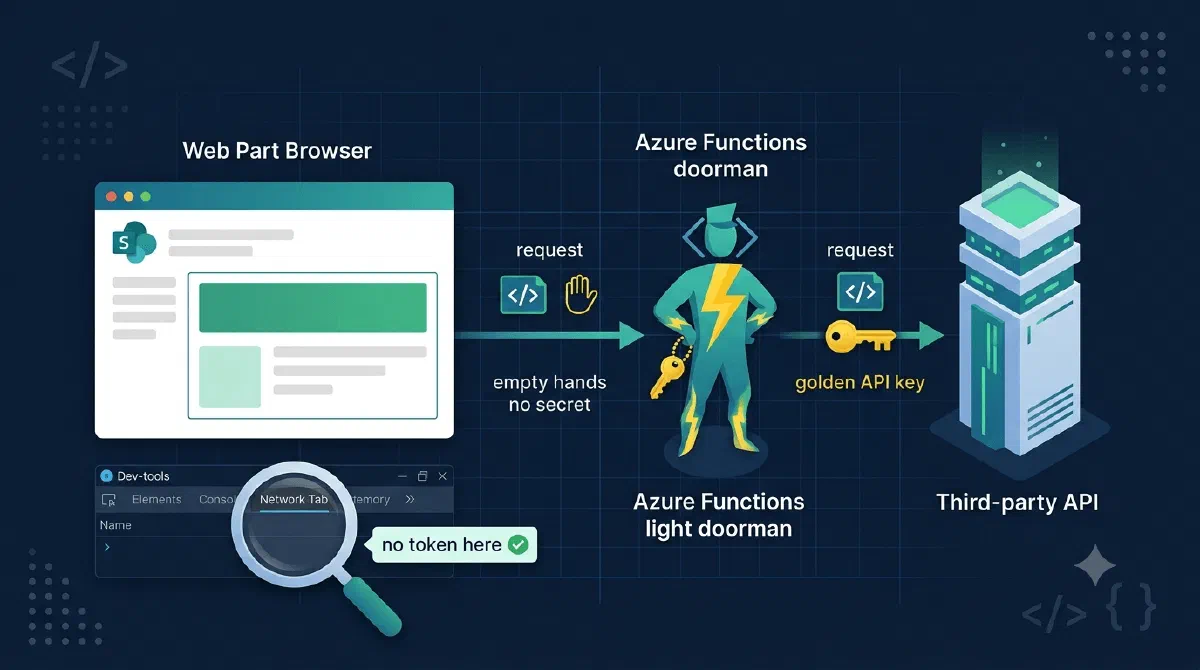
I was building an SPFx web part that shows data from a third-party system - one of those practice-management/CRM-style products with a REST API. The API authenticates the simple way: one tenant-wide key in an X-Api-Key header. Our key, for all of our data.
First instinct: call the API straight from the web part. It works in twenty minutes. Then you press F12, open the network tab, click any request… and there it is. The company’s master API key, in plain text, readable by every single user who ever loads that intranet page.
And it’s not “they can see the data the web part shows anyway” - the web part shows a filtered slice. The key unlocks the whole API: every customer, every record, every write operation the key is licensed for. Anyone who copies it out of the inspector can call the API from Postman on their couch.
TL;DR
A shared secret must never travel to the browser, because everything the browser holds, the user holds. Put an Azure Function between the web part and the API: the web part calls the function authenticated with the user’s own Entra ID token, and the function swaps in the API key server-side before forwarding the request. The network inspector now shows a call to your function carrying a short-lived, user-scoped token - the master key never leaves Azure.Why the Browser Can’t Keep a Secret
It’s worth being blunt about this, because the temptation to “just obfuscate it a bit” is real:
- Everything the browser sends is in the network tab.
- Everything the bundle contains is in the sources tab (source maps or not, strings are strings).
- Everything the app holds in memory is one breakpoint away.
There is no hiding place in the client. And “it’s only our internal SharePoint” doesn’t help - internal users are exactly the people who shouldn’t be walking around with the master key to a system they’re only supposed to see a corner of.
The Proxy Function
The fix is a small reverse proxy. One catch-all Azure Function fronts the entire third-party API:
private static readonly HashSet<string> _hopByHop = new(StringComparer.OrdinalIgnoreCase)
{
    "Connection", "Keep-Alive", "Proxy-Authenticate", "Proxy-Authorization",
    "TE", "Trailer", "Transfer-Encoding", "Upgrade"
};

[Function("ApiProxy")]
public async Task<IActionResult> Run(
    [HttpTrigger(AuthorizationLevel.Anonymous, "get", "post", "put", "delete",
                 Route = "api/{*path}")] HttpRequest request,
    string? path,
    CancellationToken ct)
{
    var targetUri = _settings.BaseUrl.TrimEnd('/') + "/" + (path ?? "")
                  + (request.QueryString.Value ?? "");

    using var upstream = new HttpRequestMessage(new HttpMethod(request.Method), targetUri);

    if (request.Method is "POST" or "PUT" || request.ContentLength is > 0)
    {
        upstream.Content = new StreamContent(request.Body);
        if (request.ContentType is not null)
            upstream.Content.Headers.TryAddWithoutValidation("Content-Type", request.ContentType);
    }

    foreach (var (key, values) in request.Headers)
    {
        // Never forward the client's Host, any API key they try to sneak in,
        // or hop-by-hop headers that belong to *this* connection only.
        if (key.Equals("Host", StringComparison.OrdinalIgnoreCase) ||
            key.Equals("X-Api-Key", StringComparison.OrdinalIgnoreCase) ||
            _hopByHop.Contains(key))
            continue;

        if (!upstream.Headers.TryAddWithoutValidation(key, (IEnumerable<string?>)values!))
            upstream.Content?.Headers.TryAddWithoutValidation(key, (IEnumerable<string?>)values!);
    }

    // The swap. The secret exists only here, on the outbound leg.
    upstream.Headers.Add("X-Api-Key", _settings.ApiKey);

    var client = _httpClientFactory.CreateClient("upstream-api");
    using var response = await client.SendAsync(upstream, HttpCompletionOption.ResponseHeadersRead, ct);

    _logger.LogInformation("Proxy: {Method} {Path} → {StatusCode}", request.Method, path, (int)response.StatusCode);

    var httpResponse = request.HttpContext.Response;
    httpResponse.StatusCode = (int)response.StatusCode;

    foreach (var (key, values) in response.Headers.Concat(response.Content.Headers))
    {
        if (_hopByHop.Contains(key)) continue;
        httpResponse.Headers.Append(key, values.ToArray());
    }

    await response.Content.CopyToAsync(httpResponse.Body, ct);
    return new EmptyResult();
}
What’s happening here?
Route = "api/{*path}"is a catch-all.GET /api/customers/123/tasksbecomesGET https://the-api.example/customers/123/tasks, query string included. One function fronts the whole API surface - when the vendor adds endpoints, the proxy needs zero changes.- The header loop deliberately strips any inbound
X-Api-Key. A caller can’t inject their own key or override yours - whatever they send in that header dies at the proxy. - The hop-by-hop set (
Connection,Transfer-Encoding, …) is the detail naive proxies get wrong. Those headers describe one connection, not the request; forwarding them causes wonderfully confusing breakage. - The real key is added to the outbound request only. Response headers get copied back to the browser, but request headers are never echoed - so the key physically cannot appear in the inspector. It’s not hidden; it’s absent.
ResponseHeadersRead+CopyToAsyncstreams the upstream response straight through without buffering it in the function’s memory, and upstream status codes pass through untouched so the web part can react to a 404 or a 429 honestly.
Where the Key Lives
Server-side config, strongly typed, validated at boot:
services.AddOptions<ApiSettings>()
    .Bind(configuration.GetSection("UpstreamApi"))
    .Validate(s => IsConfigured(s.BaseUrl), "UpstreamApi:BaseUrl must be configured.")
    .Validate(s => IsConfigured(s.ApiKey), "UpstreamApi:ApiKey must be configured.")
    .ValidateOnStart();

private static bool IsConfigured(string value) =>
    !string.IsNullOrWhiteSpace(value) && !value.StartsWith('<');
The value itself comes from Function App settings - ideally as a Key Vault reference - never from a committed file. ValidateOnStart() plus the <placeholder> guard means a misconfigured secret fails the deployment at boot, not at the first user’s click three days later.
Hiding ≠ Authorizing
Here’s the part that’s easy to skip and shouldn’t be: as shown so far, the proxy hides the key from the browser, but anyone who discovers the function URL can call it - and burn your API quota with your key. We’ve moved the secret, not secured the door.
Lock the function to Entra ID. Create an app registration for the function API, expose a scope (the convention is access_as_user), and have the function validate incoming JWTs - signature, issuer, and audience, not just parsing the claims out. Parsing is reading the name tag; validating is checking the ID.
On the SPFx side, this is pleasantly little work. Declare the permission in package-solution.json:
"webApiPermissionRequests": [
  {
    "resource": "my-function-api",
    "scope": "access_as_user"
  }
]
And call the function with AadHttpClient - SPFx acquires and attaches the user’s token for you:
const client = await this.context.aadHttpClientFactory
  .getClient("api://<function-app-registration-client-id>");

const response = await client.get(
  `https://my-function.azurewebsites.net/api/customers/${customerCode}/tasks`,
  AadHttpClient.configurations.v1
);
Now open the inspector again. There is a token in the request - but it’s the user’s own token: short-lived, scoped to your function only, and useless against the third-party API. That’s the whole difference between a secret and an identity. A stolen API key is everyone’s master key forever; a stolen user token is one person’s function access for an hour.
Gotchas
- Watch what you log. Log method, path, and status - never headers. Otherwise the key you carefully kept out of the browser ends up in Application Insights, readable by everyone with portal access.
- You now front someone else’s quota. The vendor’s rate limits hit your key for all users combined. If the web part is chatty, add caching or throttling in the proxy before the vendor does it for you.
- CORS is on you. The browser is calling your function from a SharePoint origin - configure CORS on the Function App for your tenant’s SharePoint domain, not
*. - Consider narrowing the surface. A catch-all proxy forwards everything, including endpoints the web part never needed. If the API has destructive operations, whitelist the methods and paths you actually use.
Wrapping Up
A shared API key belongs on a server. Full stop. The moment it ships to a browser, every user has it, and you can’t take it back - most vendors will happily rotate the key for you, but you’ll be doing that dance on their schedule, not yours.
The proxy costs about fifty lines: catch-all route, header hygiene, one server-side header swap, and Entra ID on the front door. That turns “every intranet user carries the master key” into “every request is a named user, calling a locked endpoint, seeing exactly what the web part shows them”. 🔒
References