I’ve written a small series about making SharePoint provisioning with Durable Functions resilient: checkpointing so runs resume instead of restart, idempotent activities that survive reruns, failing fast on permanent errors, deterministic instance IDs against duplicate starts, and waiting out Graph’s eventual consistency.
Here’s the uncomfortable part. All of that is code that only runs when Microsoft’s servers have a bad day.
I had tested the happy path a hundred times. The unhappy path: zero. You can’t ask Graph to please throw a 429 at step four. So the retry ladder, the idempotency guards, the fail-fast logic - a good chunk of it had never executed outside my imagination.
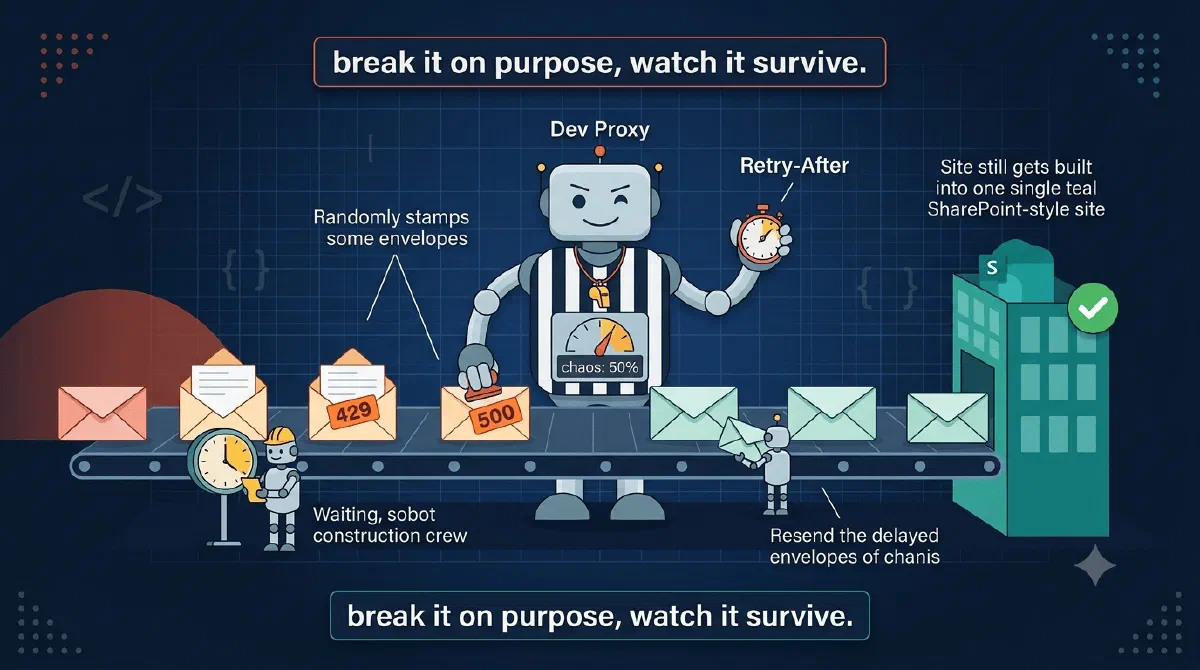
The fix is Dev Proxy: a free command-line API simulator from Microsoft that sits between your app and the real APIs and injects failures into real traffic. No code changes, no mock frameworks, no test doubles that quietly drift from reality. Your provisioning engine makes its actual Graph and SharePoint calls; the proxy just makes some of them fail.
TL;DR
Run the Functions app locally with Dev Proxy interceptinggraph.microsoft.com and your SharePoint host. Let GraphRandomErrorPlugin fail a percentage of requests with 429s and 500s while RetryAfterPlugin checks that you actually honor Retry-After. A provisioning run through that storm should still complete - slower, with retries in the logs, but with exactly one site and no duplicated artifacts. If it doesn’t, you just found out on localhost instead of in production.Point the Engine Through the Proxy
Dev Proxy works as a regular HTTPS proxy, so the setup is a config file and an environment variable. The config says which URLs to intercept and what to do with them:
{
  "plugins": [
    {
      "name": "RetryAfterPlugin",
      "enabled": true,
      "pluginPath": "~appFolder/plugins/DevProxy.Plugins.dll"
    },
    {
      "name": "GraphRandomErrorPlugin",
      "enabled": true,
      "pluginPath": "~appFolder/plugins/DevProxy.Plugins.dll",
      "configSection": "graphRandomErrorPlugin"
    }
  ],
  "urlsToWatch": [
    "https://graph.microsoft.com/*",
    "https://contoso.sharepoint.com/*",
    "https://contoso-admin.sharepoint.com/*"
  ],
  "graphRandomErrorPlugin": {
    "allowedErrors": [ 429, 500, 503 ],
    "rate": 50,
    "retryAfterInSeconds": 5
  }
}
Then start the Functions host with its outbound traffic routed through the proxy:
devproxy --config-file devproxyrc.json    # terminal 1
HTTPS_PROXY=http://127.0.0.1:8000 func start    # terminal 2
What’s happening here?
urlsToWatchscopes the blast radius: Graph and my tenant’s SharePoint hosts. Everything else (storage, Azurite, the Durable task hub) passes through untouched - you want chaos in the APIs you’re hardening against, not in your own plumbing.GraphRandomErrorPluginfails 50% of matching requests, randomly picking from the errors I allow. Each 429 carries a realRetry-Afterheader, just like Graph’s.RetryAfterPluginis the referee. It remembers everyRetry-Afterit hands out, and if my app calls the same URL again too early, it logs a warning and throttles the request - exactly what Graph would do, except this referee tells you about it.- Order matters:
RetryAfterPluginmust come before the error plugin in the list, or the request is already failed before the referee sees it. - On first run Dev Proxy installs a root certificate for you to trust, so it can intercept HTTPS. The Functions host picks it up from the machine store; a .NET app needs no code changes.
One Storm, Three Claims Tested
What I like about this setup is that a single chaotic run exercises most of the series at once.
The retry ladder gets rungs pulled out. With 429/500/503 flying at 50%, every layer runs for real: the SDK handlers eat the 429s, the in-activity loops eat the semantic failures, and the orchestrator reruns whole activities when those give up. Watch the logs; every message you wrote for these paths prints for the first time.
Idempotency stops being theoretical. Every activity will run twice was the claim; now they actually do. After the run completes, audit the tenant: one site, one of each list, no duplicated navigation nodes, no double-applied template artifacts. A rerun that creates a second anything is a bug you can now reproduce at will.
Back-off gets policed. The one thing your own logs can’t tell you is whether you retried too eagerly. That’s the RetryAfterPlugin line to grep for:
Calling https://graph.microsoft.com/v1.0/sites/... again before waiting
for the Retry-After period. Request will be throttled
If that shows up, some code path ignores Retry-After - in my experience usually a hand-rolled retry around a call the SDK was already retrying.
Failing Deterministically
Random chaos proves the transient path. The permanent path needs the opposite: a specific endpoint that always fails. That’s GenericRandomErrorPlugin with a rate of 100 and an errors file:
{
  "errors": [
    {
      "request": { "url": "https://contoso-admin.sharepoint.com/*" },
      "responses": [
        { "statusCode": 403 }
      ]
    }
  ]
}
Now every call to the admin endpoint is a 403, and the permanent-vs-transient claim is testable: the orchestration should fail in minutes with a clear error, not grind through the full retry ladder for half an hour bouncing off a wall. If you sit there watching attempt 7 of 10 against a guaranteed 403, you know which post to reread.
Dial the same technique the other way: rate: 100 on a single endpoint with a 503 reproduces “step four keeps dying” as often as you need while debugging, something production will never do for you on demand.
What About Just Unit Testing the Orchestrator?
Fair question, and it’s where I started. I don’t, and the reason isn’t laziness.
Unit testing a Durable orchestration in the isolated model means standing in for TaskOrchestrationContext, and that type is not built to be stood in for. You end up writing a mock that reimplements the runtime’s scheduling semantics, and then you’re mostly testing your mock. Every hour on that harness buys confidence about something you wrote, not about the thing Azure runs.
The question I actually care about is narrower: when Graph returns 429 six times in a row, does the run still end with exactly one site? That needs the real SDK, the real retry handlers, the real replay. A mock can’t answer it, because the behaviour under test lives in precisely the parts you’d be mocking out.
So the harness is the proxy, and the assertions are on the outcome rather than the call sequence. If you want unit tests here, put them on the activity bodies. Those are ordinary methods with ordinary inputs, and that’s where the logic worth unit testing lives.
Gotchas
- Plugin order is load-bearing.
RetryAfterPluginbefore the error plugins, or it never sees a request and validates nothing. The docs flag this; it’s still easy to miss. - Batches fail like Graph batches. When Dev Proxy fails a sub-request inside a
$batch, the batch returns424 Failed Dependency, matching real Graph behavior - so your batch response mapping gets tested too, not just single calls. - A distrusted cert looks like a broken tenant. If the Dev Proxy root certificate isn’t trusted, every intercepted call dies with TLS errors and your app looks catastrophically down. If literally everything fails instantly, check the cert before your code.
- Scope
urlsToWatchtightly. Let the proxy fail token endpoints or your storage account and you’re testing scenarios that don’t exist. Chaos belongs on the APIs you claim to be resilient against. - This is failure testing, not load testing. Surviving a 50% error rate says nothing about surviving a thousand concurrent provisionings. Different question, different tools.
Wrapping Up
Resilience code you’ve never watched run is a hypothesis, not a feature. Dev Proxy turns “Graph had a bad day” into a repeatable local scenario: point the provisioning engine through it, inject 429s and 500s at a rate, and check that the run still lands with exactly one of everything. The series told you how the engine should behave; this is how you catch it lying.
That series starts with Durable Functions: A Function That Sleeps for a Week if you want the behaviour before the test harness.
References