I had to build a provisioning engine. Every time a new customer lands in the business system, it creates a SharePoint team site for them: create the site, activate features, apply a template, seed a folder structure, add member groups, register the site in an inventory list. Roughly ten steps, several minutes end to end, and every single step talks to an API that can throttle, hiccup, or time out.
My first instinct was a plain Azure Function. One trigger, one method, ten steps in a row.
That instinct survived about a day. A plain function has a timeout measured in minutes. It holds its state in local variables, so when the process restarts mid-run (deployments, scale-in, Azure having a Tuesday), everything it knew is gone. Step six fails and your options are “run all ten steps again” or “reconstruct what happened from logs like a crime scene”.
And it’s not like the step-sequencing part was new to me. I’d already built ProvisioningPipeline, an open-source .NET library for composing provisioning workflows from middleware-style steps, with hooks and parallel execution. It solves the “run these steps in order, cleanly” problem well. What no in-process pipeline can solve is the other half: a pipeline in memory still dies with the process, and all its progress dies with it.
What I actually needed was a function that can run for a long time, remember how far it got, and pick up where it left off. That’s not a pattern you bolt onto a normal function. It’s a different tool, and Azure ships it: Durable Functions.
TL;DR
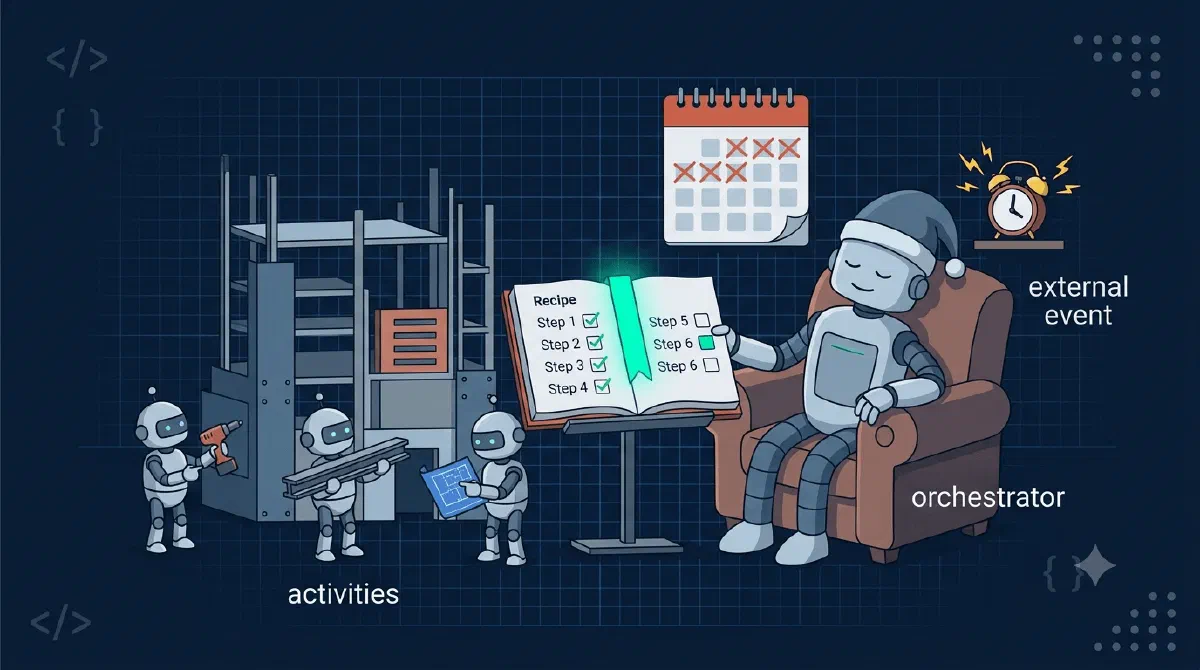
Durable Functions is an extension to Azure Functions for writing long-running, multi-step workflows as ordinary code. You split the work into three roles: a client function that starts a run, an orchestrator function that sequences the steps, and activity functions that do the real work. The runtime records every completed step in storage, so a run survives restarts, crashes, and waits that last for days. Retries are built in per step. If your process is “do these ten things in order and don’t lose progress”, this is the tool.Three Functions, One Flow
A durable workflow is made of three kinds of functions, and the separation is the whole idea.
The client is a normal function with a normal trigger - HTTP, queue, timer, whatever starts your process. Its only durable job is to schedule an orchestration and get out of the way:
[Function(nameof(StartProvisioning))]
public async Task Run(
    [ServiceBusTrigger("provisioning")] ProvisioningMessage message,
    [DurableClient] DurableTaskClient client)
{
    await client.ScheduleNewOrchestrationInstanceAsync(
        nameof(SiteSetupOrchestrator),
        message.ToSetupRequest());
}
The orchestrator is the recipe. It calls the steps in order and holds the workflow logic, but does no real work itself:
[Function(nameof(SiteSetupOrchestrator))]
public async Task RunOrchestrator(
    [OrchestrationTrigger] TaskOrchestrationContext context)
{
    var request = context.GetInput<SiteSetupRequest>();

    var site = await context.CallActivityAsync<SiteInfo>(nameof(CreateSite), request);
    await context.CallActivityAsync(nameof(ActivateFeatures), site);
    await context.CallActivityAsync(nameof(ApplyTemplate), site);
    await context.CallActivityAsync(nameof(SeedFolders), site);
    await context.CallActivityAsync(nameof(AddMemberGroups), site);
    await context.CallActivityAsync(nameof(RegisterSite), site);
}
The activities are where the actual SharePoint and Graph calls live. Each one is a small, self-contained function: CreateSite creates a site, ApplyTemplate applies a template, and so on.
What’s happening here?
- The client schedules an orchestration instance and returns immediately. Nothing waits around; the run now has a life of its own, with an instance ID you can use to check on it later.
- The orchestrator reads like a script: six awaited steps, top to bottom. This is the part that would be a state machine diagram in Logic Apps or a pile of queues in a hand-rolled solution. Here it’s just code, with loops and try/catch available when you need them.
- Every
CallActivityAsyncis a checkpoint boundary. The runtime records that the step completed, and what it returned, before moving on. - Activities take input, do I/O, return output. They don’t know they’re part of a workflow, which keeps them easy to write and easy to test.
The “Durable” Part Is a History Table
Here’s what separates this from a normal async method: the orchestrator’s progress doesn’t live in memory. Every scheduled activity and every result gets written to a history table in storage as an event.
When the process dies mid-run - and over a multi-minute workflow across enough customers, it will - the runtime picks the orchestration up on another instance and replays it. The orchestrator code runs again from the top, but every activity that already completed doesn’t re-execute; its recorded result comes straight back from history. The replay fast-forwards through the finished steps in milliseconds and resumes real work at the first step without a recorded result.
It’s a save file in a video game. The console losing power doesn’t send you back to level one; you reload and continue from the last save point. The orchestrator saves after every activity, and it never plays a level twice.
That same mechanism is why an orchestration can wait for days without costing you anything. Awaiting a durable timer or an external event just means “write the wait to history and unload from memory”. No process is alive, no compute is billed, and when the timer fires next week, replay reconstructs the state and continues. A function that sleeps for a week, literally.
What Else Is in the Box
Sequential steps are the basics. A few more capabilities, through the provisioning lens:
Per-step retries. Every activity call can carry a retry policy, and this is the built-in retry logic worth knowing about. Mine looks like this:
private static readonly TaskOptions ActivityRetryOptions = new(
    new RetryPolicy(
        maxNumberOfAttempts: 10,
        firstRetryInterval: TimeSpan.FromSeconds(5),
        backoffCoefficient: 2.0,
        maxRetryInterval: TimeSpan.FromMinutes(5)));

await context.CallActivityAsync(nameof(ApplyTemplate), site, ActivityRetryOptions);
If ApplyTemplate throws because SharePoint returned a 429, the runtime waits 5 seconds and reruns the activity. Then 10, then 20, backing off exponentially up to 5 minutes, for up to 10 attempts. The orchestration just sits there durably waiting between attempts. For workflows built on APIs that throttle, this one feature pays for the whole ticket.
Fan-out/fan-in. Steps that don’t depend on each other can run as parallel activities and be awaited together with Task.WhenAll. Seeding twelve folders one by one is a for-loop; seeding them as twelve parallel activities is the same loop without the awaits until the end.
Durable timers. context.CreateTimer(...) gives you delays and polling loops that survive restarts. Waiting 30 seconds for SharePoint to finish creating a site is a timer, not a Task.Delay and a prayer.
External events. An orchestration can pause until something outside signals it - WaitForExternalEvent is how you build “wait for an admin to approve, then continue”, even if the admin takes four days.
Status from the outside. Every instance can be queried by ID: is it running, what step is it on, did it fail and why. My provisioning engine exposes this so the business system can show “site is being created” instead of a shrug.
What It Doesn’t Do for You
An honest intro should include the bill.
Retries are per step, not per run. The retry policy reruns a failing activity. If an activity exhausts all ten attempts, the orchestration fails, and a failed run stays failed - nothing in the box restarts it from where it stopped. Resuming a dead run is a pattern you build yourself on top of these primitives.
Retried activities rerun whole. When attempt two starts, it starts from the activity’s first line, not from where attempt one died. An activity that created a site and then failed will try to create the site again. Every activity has to be written to survive running twice, and that’s on you.
Orchestrator code lives under house rules. Because the orchestrator replays, it must be deterministic: same history in, same decisions out. No DateTime.UtcNow, no Guid.NewGuid(), no HTTP calls, no reading config that might change between replays. Anything nondeterministic belongs in an activity. The rules are simple but unforgiving, and the failure mode is a corrupted run, not a compile error.
None of these are dealbreakers. They’re the shape of the tool: the runtime guarantees your progress is never lost, and in exchange you write steps that tolerate being repeated.
Gotchas
- Use the replay-safe logger in orchestrators.
context.CreateReplaySafeLogger(...)suppresses log lines during replay. A regularILoggerlogs every completed step again on every replay, and the duplicated log stream will have you debugging problems you don’t have. - Keep activities small and single-purpose. One activity per step means one checkpoint per step. A mega-activity that does five things gives you one checkpoint for five steps, and a failure at thing four reruns things one through three.
- The retry policy can’t tell a 429 from a typo. It retries every exception the same way, including the ones that will never succeed, like a broken config value. Distinguishing “try again” from “stop, a human needs to fix this” takes extra work.
- Don’t sneak I/O into the orchestrator. It compiles, it works on the happy path, and it breaks determinism the first time a replay gets a different answer. If it touches the network or the clock, it’s an activity.
Wrapping Up
A Durable Function is a workflow that remembers where it was: an orchestrator sequences the steps, activities do the work, and the runtime checkpoints every step so crashes, restarts, and week-long waits don’t lose progress. If your process has numbered steps, talks to flaky APIs, and takes longer than a request, it’s a fit - provisioning was mine.
References