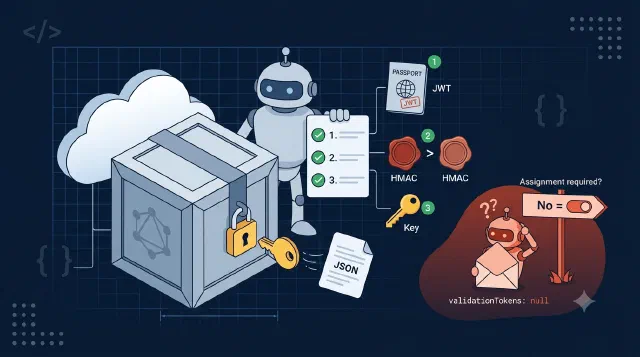
Three Base64 Blobs and a Null Token: Decrypting Graph Rich Notifications
Learn how to validate and decrypt Microsoft Graph rich notification payloads in C#, including the appRoleAssignmentRequired trap that makes validationTokens null.
Getting a token and keeping it safe: MSAL and Nested App Auth, PnP.Framework and Graph SDK auth, Easy Auth, and keeping third-party keys out of the browser.
Getting a token is the part of every integration that looks like it will take an hour and takes a day. This topic collects the auth problems I have actually hit rather than a tour of the protocol.
That includes the two client libraries you end up choosing between when talking to SharePoint from C#, and why the choice matters. Nested App Auth in an Outlook add-in, which exists because there is no popup on a phone. Easy Auth on a Function, which will happily reject the very events you configured it to receive. And keeping third-party keys server-side, because hiding a control in the UI is not the same thing as authorising the call behind it.
The through line: the hard part is rarely the token itself. It is where the token is allowed to live.
Learn how to validate and decrypt Microsoft Graph rich notification payloads in C#, including the appRoleAssignmentRequired trap that makes validationTokens null.
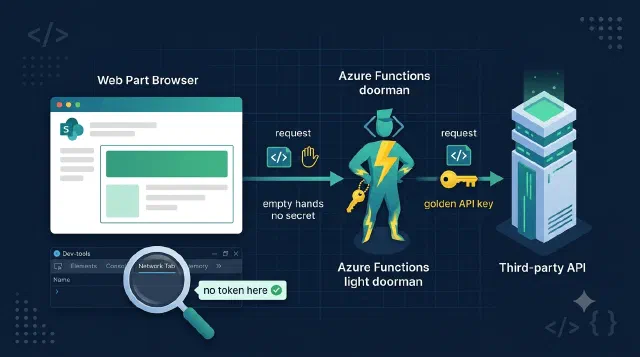
Learn how to keep third-party API keys out of the browser by proxying SPFx web part calls through an Azure Function that swaps in the secret server-side.
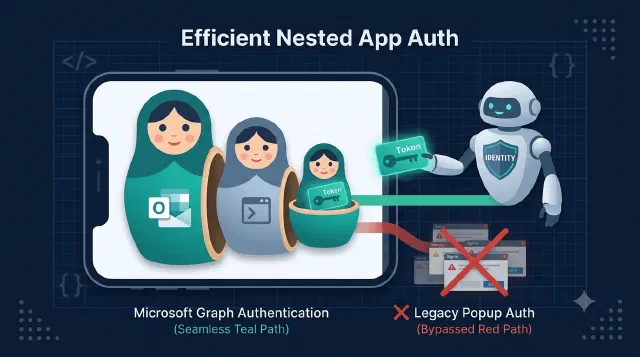
Learn how to get MSAL tokens inside Outlook on mobile with Nested App Auth (NAA), from the brk-multihub redirect URI to acquireTokenSilent with a loginHint.

Learn how to authenticate to Microsoft Graph in C# with ClientCertificateCredential, with working snippets for both the v4 SDK and the v5/v6 SDK.

Learn to authenticate C# applications with PnP.Framework and Azure using certificates in this beginner's guide to app registration and permissions.
Learn how to build an SPFx wrapper component that shows or hides content based on Microsoft 365 group membership, using getMemberGroups and a session cache.
No posts match — try another search.